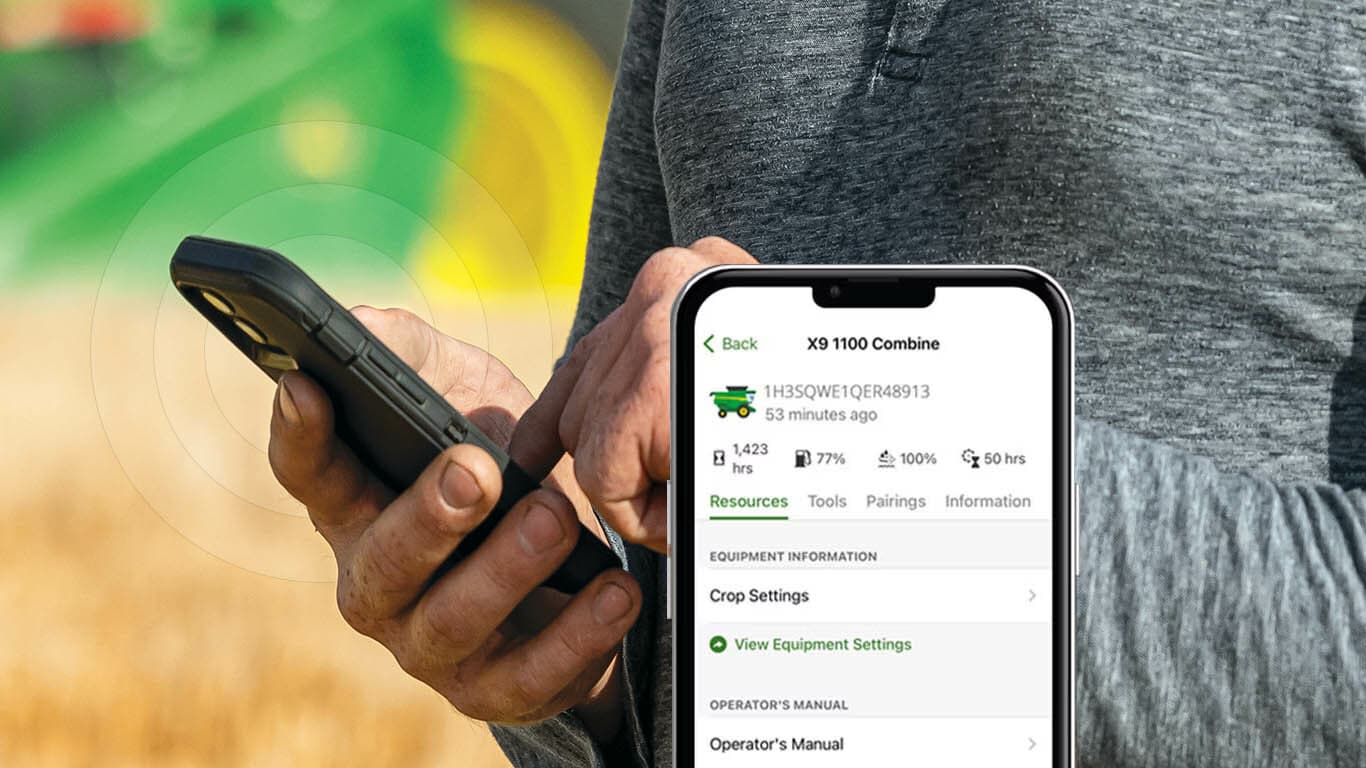
- Setup easily by pulling existing fleet data from your John Deere account
- Research and order parts conveniently1 from your mobile device
- Access your Operator’s Manual from the palm of your hand
- Want to maximise your operation? Find tips and more within the app
Features
Equipment information at your fingertips with Equipment Mobile
 For equipment big, small, green and yellow, get the information you need when you need it on Equipment Mobile
The popular Equipment Mobile app is a great tool for any size and type of operation. Keep your equipment ready to go with important details in the app such as maintenance information and instructions, parts information specific to your equipment, and other specifics that are vital to machine health and performance.
Whether you mow lawns, plant fields, clear brush, bale hay, build houses, or roads, you have key information readily available when you need it such as:
- Make, type, model year, serial number
- Access your machine-specific parts catalog and order parts easily through Shop.deere.com
- Operators’ manual – AI searchable to quickly and easily locate needed information
- Maintenance information and instructions
- Safety instructions
- Bar code scanner to add more equipment with your smartphone
For machines with JDLink™ connection, access these key equipment details and features such as:
- Engine hours
- Fuel and DEF level (when equipped)
- Pairings of JDLink modems, StarFire™ receivers, and John Deere displays
- Sync equipment information to Operations Center and Equipment Mobile for remote fleet management and maintenance
- Remotely send controller software updates to compatible machines (modem and Gen 4 or G5 Display required, only available in US and Canada)
Learn more on additional connectivity capabilities that JDLink Modems can provide such as valuable location information, machine performance metrics, and health data.
 Key information on your smartphone anytime, anywhere
Get the right parts the first time with Shop.deere.com via Equipment Mobile
It is very important to get the right parts the first time. When you load your equipment list, you have parts information specific to your serial number in Equipment Mobile utilizing John Deere’s Shop.Deere.com. This is helpful to you and your John Deere dealer as some parts can vary by serial number for a given model. With Equipment Mobile, you can order the right parts you need to get your machine running again faster. (Only available to customers in U.S., Canada, Brazil, UK).
 Use Equipment Mobile to find the right parts with Shop.Deere.com
Factory Maintenance Plan Tracking and Auto Assigned Plans
The maintenance features that have been in Operations Center are now in the palm of your hand with Equipment Mobile. Now with the integration of Shop.deere.com, you can seamlessly add the parts you need for a maintenance interval to your universal Shop.deere.com cart and check out, all within the app. Equipment Mobile simplifies maintenance, helps you stay ahead with proactive upkeep, makes part ordering easier, and improves communication between dealers, technicians, and you. Keep your John Deere equipment always ready to go with Equipment Mobile. (Only available to customers in U.S., Canada, Brazil, UK).
 Maintenance tracking and parts purchasing for maintenance intervals
Benefits:
- Easily assign factory-recommended plans with hour-based intervals to your equipment.
- Majority of model year 15+ 1-6 series tractors, riding lawn mowers, compact and mid-size loaders will have the factory-recommended maintenance plans automatically assigned when equipment is added to your organization.
- View past due and upcoming maintenance intervals by individual machine.
- Log completed maintenance with task-level details and document notes.
- View history of completed maintenance.
- Easily look up, view, and purchase parts via the integration of Shop.Deere.com within Equipment Mobile.
- Keep notes to track the important details.
View Maintenance with Equipment Mobile in Help Documentation to understand how to add a factory maintenance plan and to see an example of an automatically assigned maintenance plan.
More features for your farming needs
Equipment Mobile includes many features geared toward everyday use on the farm. Key tools that producers have come to love include:
- Planter row runoff and meter performance list
- Sprayer nozzle selection, tank mix calculator, and direct injection calculator
- Air seeder tanks scale weights and meter calibrations
- Combine loss percentage calculator and performance tuning
With Equipment Mobile you can review Gen 4 CommandCenter™ display and GreenStar™ 3 2630 display on-screen help guides, setup information for StarFire 3000, 6000, and 7000 receivers, and a variety of AutoTrac™ guidance information.
Equipment Mobile also provides tools for JDLink modems such as:
- Connecting your machine to a wireless network
- Connecting other wireless devices to your machine
- Troubleshooting data transfer issues (Modular Telematic Gateway / MTG diagnostic)
All this is available in ONE mobile app, Equipment Mobile. There is no need for multiple mobile apps if you previously used EquipmentPlus, TractorPlus™, GoHarvest™, SeedPlus™, GoBale™, GoCotton, GoChop, PlanterPlus™, ApplyPlus™, GoCane, GoTill, or SolutionsPlus.
Helpful resources
To download the FREE Equipment Mobile app, visit your favorite app store or scan the following QR code:

Any size and type of operation will appreciate the features in the Equipment Mobile application. Use the link for help documentation about the application.
A John Deere account is needed to use the Equipment Mobile app. Here’s a great overview of how to do it: How To Create A John Deere Account | John Deere (youtube.com). You simply need to create one John Deere account to access Equipment Mobile. If you already have a John Deere account set up for Operations Center you can login to Equipment Mobile with the same username and password.
Scan this QR code to get started with your John Deere account:

Here is a great overview to help explain what is the right digital tool for each type of customer: Right digital tool, right user (deere.com)
Know more about your tractor with Equipment Mobile and a John Deere Smart Connector
 Equipment Mobile Resources
Overview
Setup, operate, and maintain your tractor with Equipment Mobile and a John Deere Smart Connector.
To download the free Equipment Mobile app, visit the Apple® App Store® or Google Play™ store.
You can now view information about your tractor with a Smart Connector in Equipment Mobile. Take advantage of familiar TractorPlus features in Equipment Mobile such as the Live Dashboard and Diagnostic Trouble Code alerts. Equipment Mobile offers additional tools to help you manage not just your tractor, but your entire fleet in one place.
Any size and type of operation will appreciate the features in Equipment Mobile. View help documentation to learn more about the application.
A John Deere account is needed to use the Equipment Mobile app. Here’s a great overview of how to do it: How to Create A John Deere Account | John Deere (youtube.com)
Benefits
Equipment Mobile:
- Quickly scan the PIN to access maintenance, parts, and manual information
- Conveniently access and share Diagnostic Trouble Codes for troubleshooting
- Receive maintenance reminders and parts recommendations to minimise downtime
- Access equipment that is already loaded into your Operations Center account by logging into Equipment Mobile with your John Deere account login
- Create daily checklists to increase efficiency
Additional details
Please note that Smart Connectors offer local connectivity via Bluetooth, while JDLink modems enable remote connectivity and provide valuable data including location, machine performance metrics, health data, access to John Deere Connected Support services, and more.
Users can still benefit from Equipment Mobile if they do not have a Smart Connector.
Installing the Smart Connector will offer additional capabilities to help monitor equipment by sending information from the tractor to the user’s mobile device using Bluetooth® wireless capability. The following table outlines the differences between using Equipment Mobile with and without a Smart Connector.
Equipment Mobile app | Additional Equipment Mobile app features with Smart Connector |
|
|
 Wireless Trouble Code Access
 Live equipment dashboard in Equipment Mobile
To pair the John Deere Smart Connector with a phone and tractor, you must first be in range with the tractor equipped with the John Deere Smart Connector. Once the Smart Connector is plugged in and the tractor is keyed on, the Smart Connector will be available to pair within Equipment Mobile. The flow of pairing a Smart Connector in Equipment Mobile is shown below.
 Step 1
 Step 2
 Step 3
Apple and App Store are trademarks of Apple Inc. Google Play, and YouTube are trademarks of Google LLC. Bluetooth is a trademark of Bluetooth SIG, Inc.
Equipment Mobile — Property Owner
 Equipment Mobile App in use on a 4052M Tractor
Equipment Mobile is the gateway to sustainable, efficient, and convenient management of your property. In this document, we will reference a few of the functions and features that you can leverage on your own. Whether you’re mowing grass, moving rock, or starting a new garden, Equipment Mobile will add value to your property.
For your compact utility tractors, you have different tools that you can leverage to understand more about your equipment. Use and access the Operator’s Manuals and Tips Notebooks for information to help you manage and maintain your machine. Additionally, you can quickly link to all the compatible implements, attachments, and loaders that you can use on your property.
 View compatible implements and loaders in the Equipment Mobile app
 Use filters to view compatible attachments in the Equipment Mobile app
 View compatible loaders in the Equipment Mobile app
There are various features that operators can use in Equipment Mobile to improve operational efficiency. One of the features is the factory installed maintenance plans. In this section, you will get step-by-step instructions on the specific components within your machine that you should inspect at certain points in time. These processes ensure that your equipment is ready to go when you need it. Additionally, you have a dedicated section for pairings. In this section, you will see any modem or smart connector that you have connected to your equipment. See additional information about the smart connector here, Know more about your tractor with Equipment Mobile and a John Deere Smart Connector. You also have the option to edit the names of any equipment you’re using to stay organized on your property.
 Maintenance tab in the Equipment Mobile app
 Pairing tab in the Equipment Mobile app
 Information tab in the Equipment Mobile app
Equipment Mobile — Large Ag
 Equipment Mobile App in use on a combine in the field
In a fast-paced and evolving world of agriculture, the need for advanced technology solutions has never been greater. Equipment Mobile is a tool that you can leverage that will transform how you manage your large agriculture operation, manage your equipment, and access data. In this document, we will reference a few of the functions and features that you can use to help you manage and own your Equipment. Whether you’re getting ready to plant, doing scheduled maintenance, or analyzing data from your machines, Equipment Mobile will make your life more efficient, convenient, and sustainable.
In Equipment Mobile, there are built-in tools for different pieces of Equipment. There is a Grain Loss Calculator built into the application to make this process seamless for the user. You will find this calculator under the resources tab.
You will find other impactful resources in Equipment Mobile as well. From Equipment Information, Operator’s Manuals, and the ability to View Diagrams and order parts directly from the application, Equipment Mobile is your hub for maintenance and performance.
 Resources tab for the S770 Combine in the Equipment Mobile app
 Grain Loss Calculator in the Equipment Mobile app
 Choose Publication option in the Equipment Mobile app
Equipment Mobile makes maintaining your tractor easier than it has ever been before. Not only are you supplied with resources: Documentation, Parts, and Accessories, and potential software updates. But you also have pre-installed factory maintenance plans to ensure that you are up to date with your machine. If your tractor has a modem, you also get additional data like fuel levels, engine hours, and DEF. Additionally, view your active pairings within the application and potential software updates for your displays, modems, and receivers. Equipment Mobile makes maintenance and information more accessible than it has ever been before.
 Resources tab for the 8R Tractor in the Equipment Mobile app
 Maintenance tab for the 8R Tractor in the Equipment Mobile app
 Pairings tab for the 8R Tractor in the Equipment Mobile app
 Information tab for the 8R Tractor in the Equipment Mobile app
Specific implements used within Equipment Mobile have their own sets of tools. For example, your planter will have the same list of references as your other machines: Equipment Information, Operator’s Manuals, Diagrams, and Parts, etc. However, you will have a unique list of tools for that equipment. Utilize the Row Runoff and Meter Performance Tests. There are demos within the application to ensure that you understand the tools.
 Resources tab for the 1725NT Planter in the Equipment Mobile app
Equipment Mobile — High Value Crops
Managing high value crops require careful attention and precision to maximize profitability. By using real-time data and advanced management tools, Equipment Mobile helps growers streamline their operations at every step of the farming process.
Where can Equipment Mobile be used in High Value Crops?
- Bedded crops:
- Field preparation, planting, spraying, weeding, harvest: Keep track of your fleet to significantly reduce unplanned downtime by being able to easily track equipment maintenance records and order parts.
- Orchards:
- Spraying, weeding, mowing, harvest: Keep track of your fleet to significantly reduce unplanned downtime by being able to easily track equipment maintenance records and order parts.
- Vineyards:
- Spraying, weeding, mowing, harvest: Keep track of your fleet to significantly reduce unplanned downtime by being able to easily track equipment maintenance records and order parts.
Value for Owners and Managers:
- Get real-time alerts for maintenance needs and performance metrics. This allows you to catch any potential issue before they turn into costly downtime.
- Easily update your equipment’s software directly from the app
- For equipment equipped with a modem, view additional machine data including, fuel levels, engine hours, and DEF
Value for Operators and mechanics:
- Easily order John Deere parts for John Deere machines. Your equipment list will take you to the directly to the parts you are looking for. Once you find the part you need, simply add it to your cart in Equipment Mobile and order it through the app. The dealer will receive the order and fill it for you.
- View diagrams and manuals for John Deere equipment that you need to work on.
How can Equipment Mobile fit in your current fleet?
- If your equipment is not already added in your organization in Operations Center, easily start adding your John Deere equipment to Equipment Mobile by going to the equipment section, select add, and either scan or manually enter the serial number, and select save.
- If your equipment has already been added top Operations Center, it will automatically transfer the information into Equipment Mobile.
- For competitive equipment and on-highway vehicles, simply follow the same instructions, but you will need to manually enter the serial numbers.
 Resources tab for the 3032E Tractor in the Equipment Mobile app
 Use filters to view compatible attachments in the Equipment Mobile app
 View compatible loaders in the Equipment Mobile app
 Maintenance tab for the 3032E Tractor in the Equipment Mobile app
Equipment Mobile — Hay/Forage
 Equipment Mobile App in use on a 6R Tractor
Equipment Mobile is the gateway to sustainable, efficient, and convenient management of your equipment on your operation. In this document, we will reference a few of the functions and features that you can leverage on your farm. Whether you’re planting crops, baling hay, or feeding livestock, Equipment Mobile will make your experience unique and optimize your time and effort on your operation.
When harvest hits, you need your equipment ready to go to maximize yields. Monitor the engine hours, fuel and DEF levels, and track the maintenance of your tractor all in one place. For maintenance, you have factory plans that are pre-installed into the application for each machine. When you log hours, the app will remind you to check, clean, and replace components of the tractor to ensure that your equipment is field ready. In the app, you can also view displays, receivers, and modems that are connected to your machine. This feature helps you stay up to date with different software updates as they release. You can also edit the names of difference pieces of equipment to keep track of where each machine is on your operation.
 Resources tab in the Equipment Mobile app
 Maintenance tab in the Equipment Mobile app
 Pairing tab in the Equipment Mobile app
 Information tab in the Equipment Mobile app
There are many features for hay-exclusive customers that allow them to get the most out of their equipment. In resources, there is a section called "Equipment Information". This section comes stockpiled with different tabs: maintenance, monitor, equipment setup, in-field, and safety.
 Resources tab for the 560M Round Baler in the Equipment Mobile app
 Stockpile of Different Tabs under “Equipment Information"
Maintenance: In this section you will get step-by-step instructions on the specific components within your machine that you should inspect. These are listed in intervals to make it as convenient as possible. An example of the steps in these sections is shown below.
 Example of first step of maintenance instructions
 Example of second step of maintenance instructions
 Completion screen
You will see similar steps and display screens for the following sections as well: Monitor, Equipment Setup, In Field, and Safety.
 Monitor section on Equipment Mobile app
 Equipment Setup section on Equipment Mobile app
 In Field section on Equipment Mobile app
 Safety section on Equipment Mobile app
We have a range of finance options to suit any customer. Contact your local Emmetts branch, or visit these sites for more information and a free quote.